


Your phone is on the nightstand, connected to a wireless pad, while a wall adapter marked 30W glows softly beside it. The phone may appear to be receiving a fixed stream of power, but a modern smart charger is doing something more careful. It identifies the device, agrees on a suitable electrical profile, adjusts delivery as the battery fills, and reacts to temperature and charging conditions.
That makes a smart charger for a phone more than a high-wattage power brick. It's a charger and device working together through a control protocol, with USB Power Delivery, Quick Charge, and PPS among the common systems. The important question isn't only how many watts appear on the packaging. It's whether the charger, phone, cable, and battery-management system can communicate safely.
Table of Contents
- What a Smart Charger for Your Phone Actually Does
- How Smart Chip Recognition Works Between Charger and Phone
- The Charging Curve and Why Wattage Alone Is Misleading
- Compatibility Check for Phones, Cables, and Protocols
- Reading LED Status Indicators the Right Way
- Overnight Charging Safety and Counterfeit Risk
- Choosing and Using a Smart Charger With Confidence
What a Smart Charger for Your Phone Actually Does
A basic adapter can provide a preset output. A smart charger adds a control layer. Its onboard chip communicates with the phone before substantial power flows, then continues managing the session while the battery charges.
Think of the charger as a careful waiter rather than a tap left fully open. The charger presents the power options it can provide. The phone chooses what it can accept. The charger then supplies the agreed voltage and current instead of forcing its maximum output into the device.
That conversation performs three practical jobs:
- Device identification: The charger and phone recognize what each side supports.
- Power negotiation: They select a safe voltage and current combination.
- Ongoing adjustment: The system responds to battery level, temperature, cable capability, and charging limits.
The logic lives in both the wall adapter and the phone. USB Power Delivery is the closest thing to a broadly universal fast-charging standard, and its latest revision supports up to 240W, although phone-class adapters commonly operate between 20W and 100W. USB Power Delivery explained through modern fast-charging standards shows why the phone pulls only the power it can safely accept when the device and charger implement the protocol correctly.
A 100W USB-PD charger, therefore, doesn't automatically send 100W to a phone. The phone may request a much lower profile, and the charger follows that request. This is why one adapter can often serve a phone, tablet, and laptop without treating every connected device as if it needs the same output.
Practical rule: Buy wattage for useful headroom, but judge the charger by its protocol support, protection features, and cable compatibility.
The handshake explains how the charger chooses a safe starting point. The charging curve explains why the phone's actual wattage changes later, even when the same charger remains connected.
How Smart Chip Recognition Works Between Charger and Phone
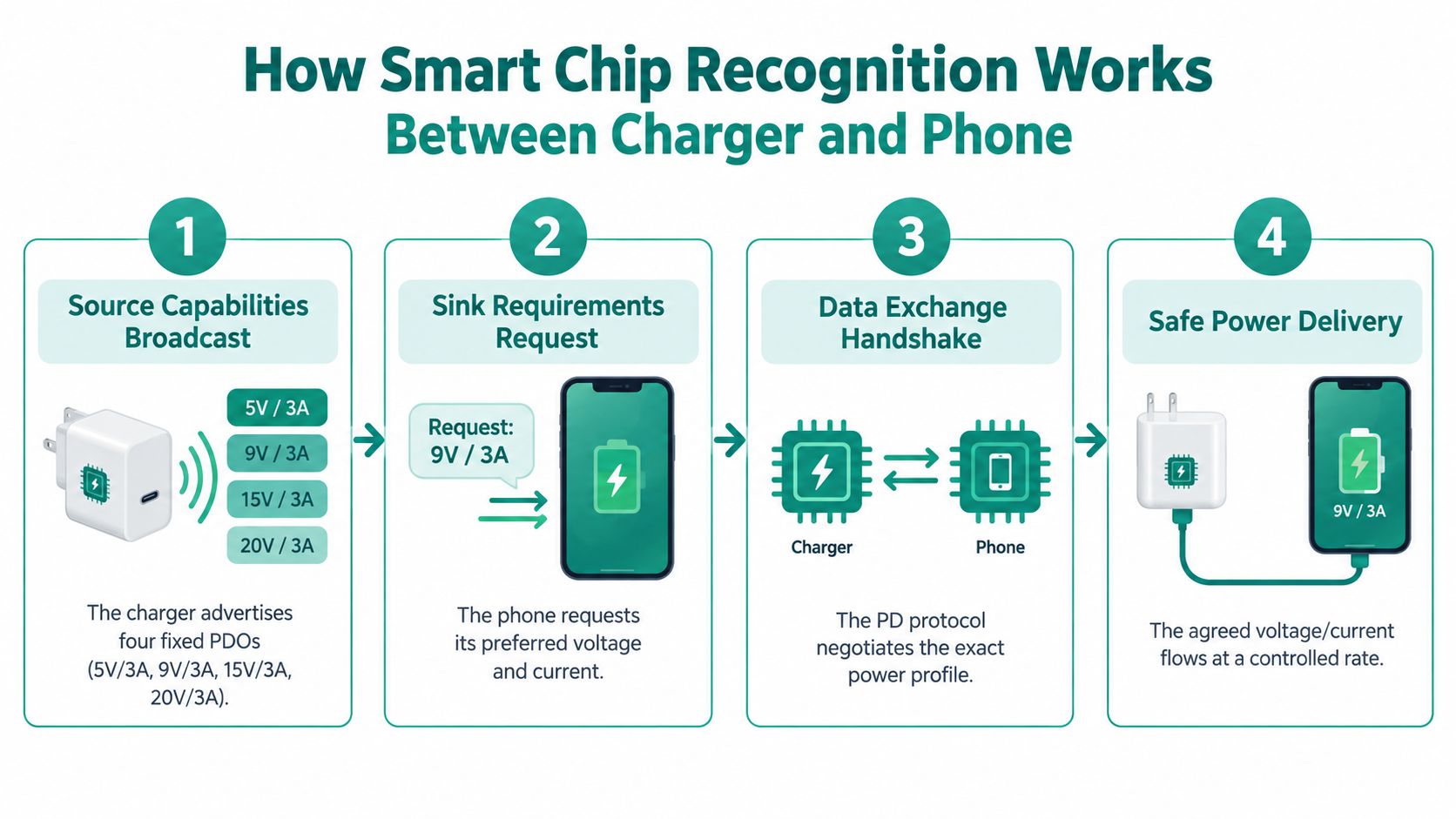
USB Power Delivery makes the exchange easier to understand because it treats charging as a structured conversation. The charger is the source, while the phone is the sink, meaning the device receiving power.
The four stages of the handshake
-
The charger announces its capabilities.
It sends a Source Capabilities message listing supported power profiles. A charger might advertise fixed PDOs such as 5V/3A, 9V/3A, 15V/2A, and 20V/1.5A, along with optional PPS ranges. PDO means Power Data Object, a description of a voltage and current combination the charger can provide. -
The phone selects a suitable request.
The phone reads that list and chooses a profile its charging IC and battery can accept. A mid-size phone might select 9V, while a compatible flagship device could request an adjustable 11V PPS profile. The exact choice depends on the phone's design, battery condition, temperature, and software. -
The charger accepts the contract.
After the phone sends its request, the charger replies with an Accept message. It then shifts its output to the agreed profile. Until that exchange is complete, the charger does not jump to its highest advertised voltage. -
The devices keep communicating.
The contract isn't necessarily the end of the conversation. Further messages can account for thermal headroom, cable current capability, and the battery's changing state. The phone can ask for less power as heat rises or as the battery approaches a fuller state.
The system can also support a role swap. In a suitable USB-C arrangement, a laptop or accessory may request power from the phone instead of the phone receiving it. That's one reason USB-C charging can feel more flexible than older fixed-output adapters.
The negotiated profile also explains why a charging application may show changing wattage. The phone might begin near its permitted peak, reduce current as temperature increases, and lower delivery again near the top of the charge. The charger isn't failing when the number falls. It's following the device's changing request.
A correctly implemented USB-PD charger helps prevent an unsuitable voltage from being applied only because the adapter has a higher maximum rating. That protection depends on genuine protocol implementation, a suitable cable, and functioning hardware on both sides.
The following video offers a visual explanation of the charging exchange and the hardware involved.
The Charging Curve and Why Wattage Alone Is Misleading
A charger's peak wattage tells you the upper limit of a power contract, not the experience across the entire charging session. Fast charging normally starts aggressively, then slows as the battery approaches a higher state of charge.
The first phase is the high-power portion. At a low or medium battery level, the phone may accept a substantial current because there's more thermal and chemical headroom. A 65W adapter might deliver close to its permitted level for part of the session, but only if the phone, cable, protocol, and internal charging system all support it.
The second phase tapers. The phone may hold voltage while reducing current to manage heat and battery stress. The final phase is slower still, because the system must approach the battery's upper voltage limit carefully rather than continuing to push maximum current.
Belkin's explanation of fast-charging behavior describes why common systems such as USB-PD and Quick Charge can offer high output while real-world performance remains limited by the phone's charge controller, battery chemistry, and heat dissipation.
A useful way to read the curve
| Charging phase | What the phone usually does | Why the behavior changes |
|---|---|---|
| Low to medium battery | Accepts the strongest suitable power profile | The phone has more room to manage incoming energy |
| Middle of the session | Reduces current while maintaining a controlled voltage | Heat and battery stress need closer management |
| Near full charge | Tapers substantially, sometimes to a low trickle | The battery-management system protects the cell as it reaches its upper limit |
A 25W adapter doesn't guarantee 25W for the entire session, just as a 100W adapter doesn't make every compatible phone charge at 100W. The phone sets the practical ceiling, and the charging curve determines how long that ceiling lasts.
Thermal control is central. As the phone warms, its software and charging IC can reduce power even when the adapter remains cool. A warm phone under a pillow, in direct sunlight, or inside a thick case may slow more quickly than the same phone on an open desk.
The fastest charger is the one that maintains a suitable power level without creating excess heat. Peak wattage is only one part of that balance.
The last part of charging often feels disproportionately slow because the phone is prioritizing controlled voltage and battery longevity over speed. That behavior is a feature of a protective charging system, not evidence that the smart charger has stopped working.
Compatibility Check for Phones, Cables, and Protocols
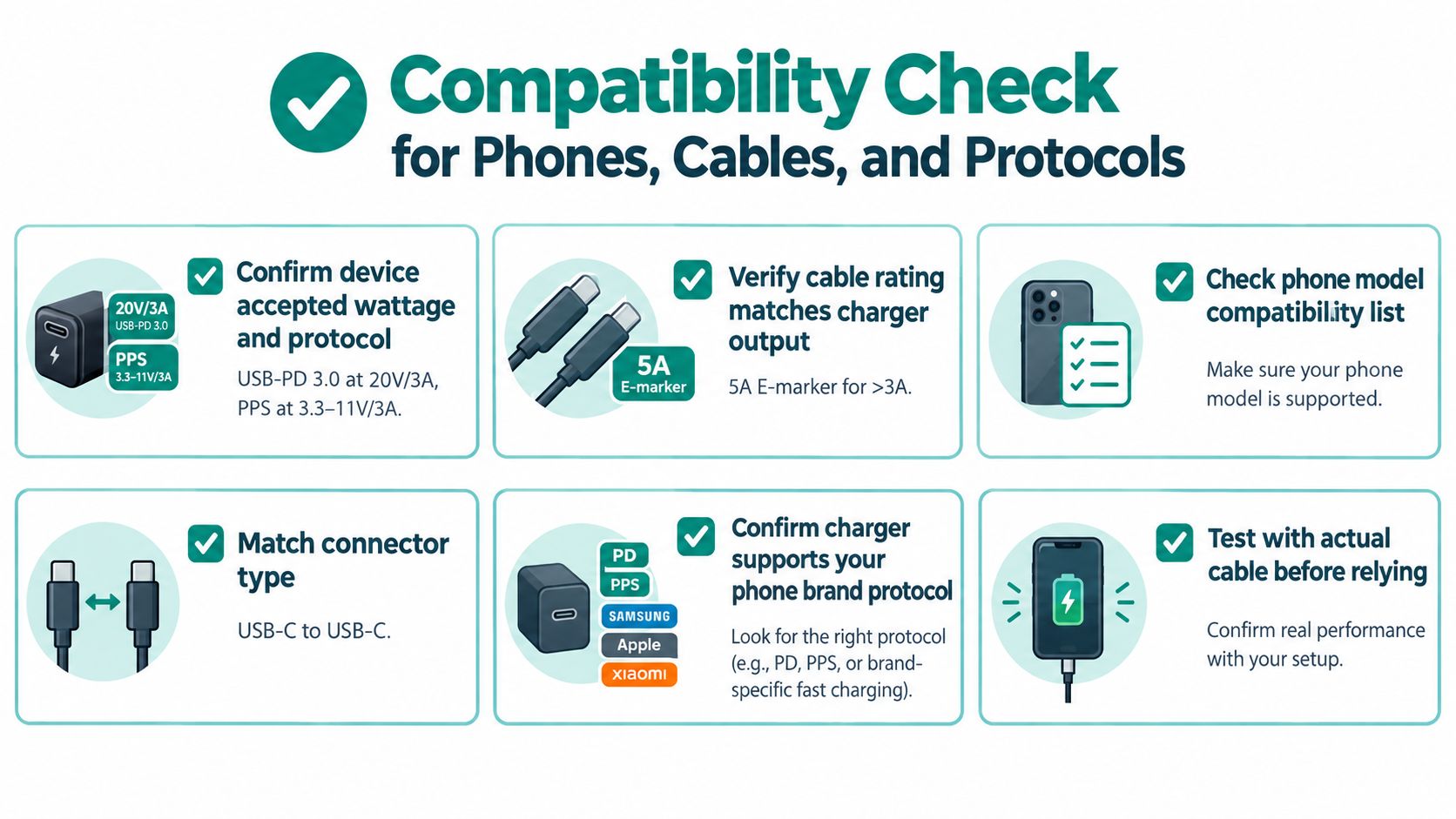
Compatibility starts with the phone, not the charger's box. Find the device's accepted input wattage and supported protocols in its specifications, then compare those details with the adapter and cable.
A phone that supports USB-PD may charge normally from a USB-PD adapter, but a proprietary system such as VOOC or Warp may require its own compatible charger and cable for its highest advertised mode. If the charger and phone share only a basic profile, the connection can fall back to the lowest common speed without notice.
Match the three parts
1. Check the phone's input requirements.
Look for USB-PD, PPS, Quick Charge, or a manufacturer-specific system. A specification might list USB-PD 3.0 at 20V/3A, PPS at 25W, or another supported profile.
2. Read the charger label.
Check the output profiles printed on the brick, not just the large wattage number. A charger labeled 65W may provide that power through one port, share it across ports, or reserve it for a particular voltage-current combination.
3. Inspect the cable.
A standard 3A cable may support common fast-charging arrangements, while higher-power charging can require a 5A electronically marked cable. The cable's printed rating matters because two cables with identical USB-C connectors may have very different current limits.
4. Test the complete setup.
Use the phone's battery screen or a trusted power meter to see whether the expected charging mode appears. A real-world timing check can reveal a bottleneck that product labels don't make obvious.
What happens with several devices
A GaN charger may power a laptop, tablet, and earbuds from one brick, but its controller has to allocate power between ports. A capable multi-port model can adjust that allocation as devices connect, disconnect, or change their requests.
That doesn't mean every multi-port charger delivers its printed maximum to every port simultaneously. Read the per-port output table and check how the adapter behaves when multiple devices are active. If a laptop begins charging slowly after a phone is connected, the charger may have reassigned its available power rather than malfunctioned.
The cable remains part of the negotiation. A charger and phone can support a high-power profile, but a lower-rated cable may limit the request or cause the system to select a safer, slower mode. Matching the phone, protocol, port, and cable is more reliable than choosing a larger number on the adapter.
Reading LED Status Indicators the Right Way
An LED can provide a quick visual clue, but it isn't a universal language. One charger may use green for full charge, while another uses green for standby or a completed handshake. Always compare the light with the charger's manual and the phone's own battery screen.
Common guide conventions associate red with charging or a low battery, green with a full battery or standby, and blinking or pulsing patterns with active charging, completion, or a fault. A guide to common charger LED meanings explains why the same color can represent different states across product designs.
A practical decoder
| LED Pattern | Charging State | Meaning |
|---|---|---|
| Solid red or amber | Active charging | Power is being delivered, but the exact speed requires confirmation on the phone |
| Pulsing or blinking light | Active negotiation or charging | The charger may be communicating with the device or indicating a changing state |
| Green or blue | Full charge, standby, or completed session | The device may have reached its target or reduced active charging |
| Dim or off | Low-power maintenance or no active session | Check the phone screen, cable, outlet, and charger manual |
| Rapid or unusual flashing | Possible warning | Inspect temperature, contacts, cable condition, and protocol compatibility |
Don't treat a colored light as proof of fast charging. A red indicator can appear during a low-power 5V session or a higher-power session, depending on the product. The phone's battery screen is the better confirmation of whether a fast-charging mode is active.
LED behavior can also be useful on smaller USB-rechargeable products. The 3D Folding Book Light LED Night Light lists a 5V/500mA charging voltage, a built-in 18650 lithium-ion battery, and a red charging indicator that turns off when full. That illustrates an important distinction: a product's LED may show charging completion without reporting a negotiated fast-charging profile.
If the LED changes unexpectedly, check the simplest causes first. Reseat the cable, inspect the connector for debris, try another known-good cable, and compare the result with the phone's charging notification. A light is a diagnostic hint, not a certification mark.
Overnight Charging Safety and Counterfeit Risk
A genuine USB-PD or PPS handshake improves control, but it doesn't make every charger safe to leave unattended. Protocol safety and product safety are different questions. The protocol defines how the devices negotiate power. Product safety depends on construction, thermal monitoring, over-current protection, insulation, certification, and the condition of the charger, cable, and phone.
Health Canada's 2023–2024 USB charger compliance project found 1 alert and 17 recalls among tested outlet chargers, with the non-compliant products judged likely to pose danger to human health or safety. Electrical Safety First's guidance on USB charger risks also distinguishes a correctly negotiated charge from the risks created by defective cables, devices, or poorly made products.
A phone on a nightstand may spend much of a long charging session in a reduced-power phase after its faster initial period. That doesn't remove the risk of heat. Airflow matters, so don't charge the phone under bedding, inside a bag, or against materials that trap warmth.
Overnight check: Use a genuine, correctly rated charger and cable, keep the phone uncovered on a hard surface, and don't rely on an LED alone to prove that the setup is safe.
Official lithium-ion safety guidance says most batteries include overcharge protection, but defective or low-quality batteries can still overheat when charged beyond recommended conditions. Canadian Centre for Occupational Health and Safety guidance recommends careful matching and handling because a mismatched charger or damaged battery can increase fire risk. MIT's lithium battery safety guidance notes that most lithium-ion cells should not be overcharged above 4.2V, and series battery packs require balance charging so each cell is monitored.
How to screen an unfamiliar charger
- Check the markings: Look for relevant certification information, but don't assume a printed logo proves genuine compliance.
- Inspect construction: Loose parts, rough seams, unusual heat, damaged insulation, or a strong electrical smell are reasons to stop using the charger.
- Verify the seller: Avoid listings that conceal the manufacturer, safety documentation, or model identity.
- Watch idle behavior: A charger that becomes noticeably warm with nothing connected deserves investigation or replacement.
- Follow official safety advice: New York State guidance specifically warns against leaving lithium-ion devices charging while sleeping or unattended. Its charging and storage safety tips are especially relevant to overnight use.
The Intelligent Auto Unplug Charger with Smart Chip is listed as compatible with Huawei devices and includes smart chip recognition and a visible charging light. Those listed features can help with at-a-glance status checking, but buyers should still verify the product's electrical ratings, certification details, cable compatibility, and suitability for their specific phone.
Choosing and Using a Smart Charger With Confidence
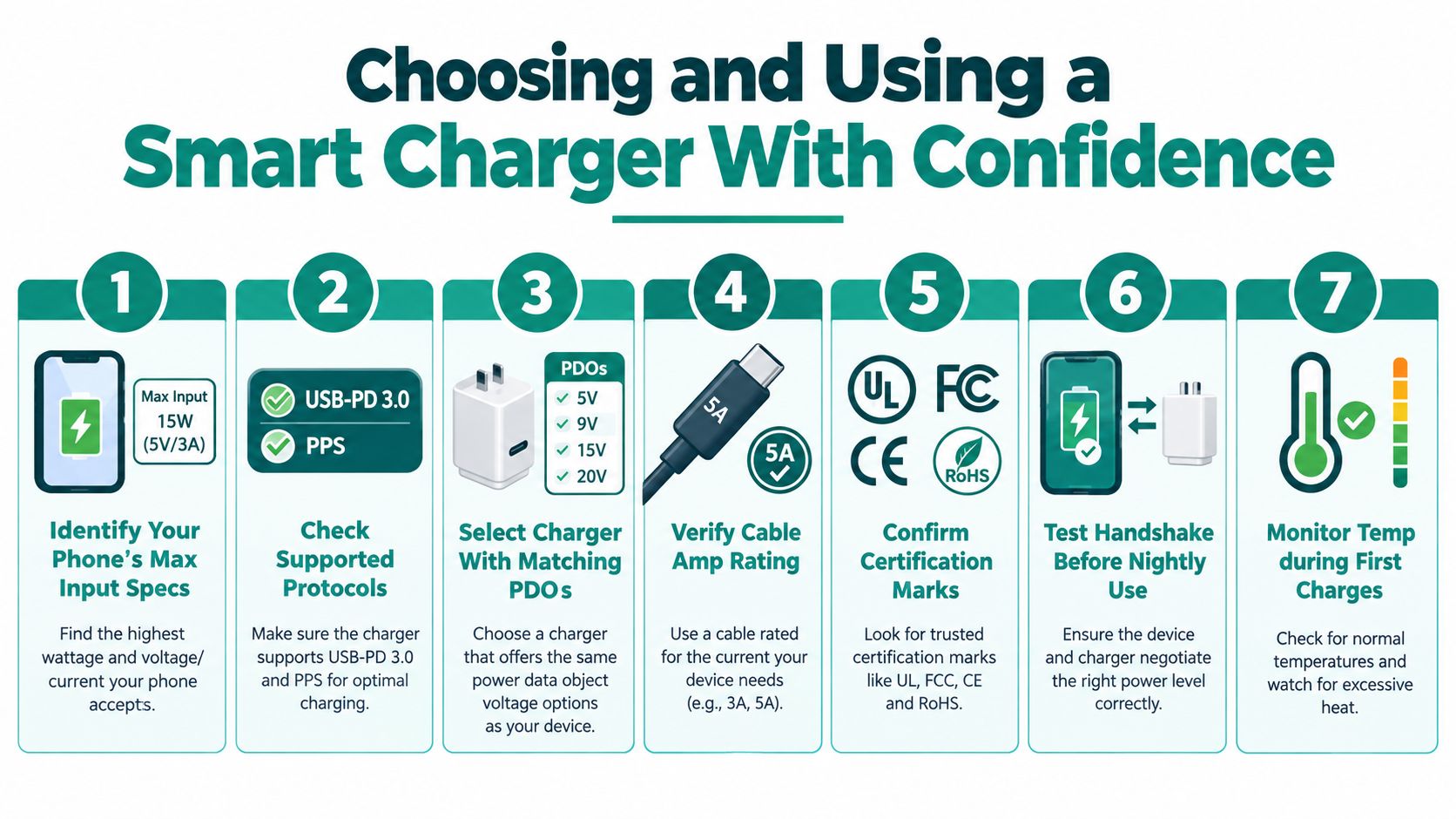
A reliable smart charger phone setup comes from matching several layers, not chasing the largest wattage label. Start with the phone's maximum input specifications, then select a charger that supports the same protocol and a cable that can carry the requested current.
Use this buying workflow
-
Identify the phone's maximum input.
Confirm the device's accepted voltage, current, and wattage. The charger's maximum output doesn't override the phone's own limit. -
Check protocol support.
Look for USB-PD 3.0 or newer, PPS where appropriate, Quick Charge, or the manufacturer's proprietary system. Samsung phones may benefit from PPS support, while other brands may depend on their own charging standard. -
Choose useful headroom.
An 18W adapter may suit a phone designed around that level. A mid-range Android phone may need a 25W to 45W class adapter, while 65W or higher makes sense only when the phone can request it or when the same charger will also serve larger devices. -
Match the cable rating.
A 5A E-marked cable is important for supported higher-power arrangements. A lower-rated cable can limit the connection even when the charger and phone both advertise more. -
Confirm safety information.
Check the manufacturer, model, certification details, output table, and return policy. A trustworthy specification sheet is more useful than a prominent wattage claim without supporting details. -
Test the handshake.
Connect the phone while it has a moderate battery level and check the charging notification. Confirm that the phone recognizes the expected fast-charging mode rather than assuming it from the charger label. -
Monitor the first sessions.
Feel for unusual heat at the charger, cable ends, connector, and phone. Observe the LED and compare it with the phone's battery display. If the charger remains warm while idle or the connection repeatedly starts and stops, discontinue use until the cause is clear.
The protection layers to look for
A sound setup uses several controls together. The device handshake prevents the charger from selecting an unsuitable negotiated profile. The thermal system reduces power when heat rises. Over-voltage and over-current protection limit abnormal electrical conditions. The LED and phone display give you visible feedback, although neither replaces certification or physical inspection.
A smart charger is also more useful when its behavior is predictable. If the phone charges quickly at a low battery level, slows near the top, and stays within a reasonable temperature range, the changing wattage usually reflects normal battery management. If it becomes hot, repeatedly disconnects, or shows an unexplained fault pattern, treat that as a reason to investigate rather than an inconvenience to ignore.
Rule of thumb: Match the protocol first, buy wattage for headroom rather than bragging rights, verify the cable, watch the LEDs, keep the phone uncovered, and avoid overnight charging on an uncertified or unfamiliar brick.
Smart charging is an everyday verification skill, not a one-time purchase decision. Read the label, understand the handshake, check the cable, observe the charging curve, and use the phone's own status screen to confirm what the charger is doing.
Zenvora offers practical electronics such as a Huawei-compatible charger listed with smart chip recognition and a visible charging light, alongside compact USB-rechargeable household products. Visit Zenvora to compare the listed specifications and choose accessories that fit your charging routine.
Generated with Outrank